Create a Dino Themed Shadow Box Photo Frame for Your Child
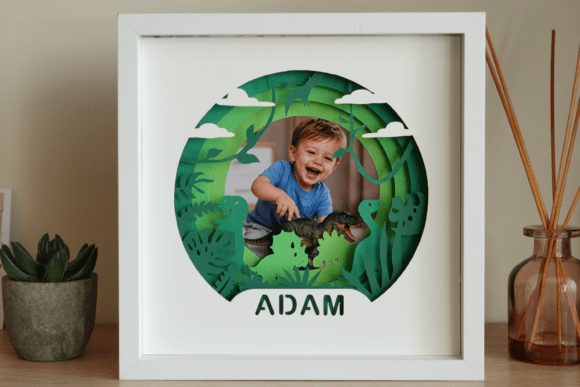
Imagine finding a craft project that isn't just another print-and-color sheet. The Dino Themed Shadow Box Photo Frame is exactly that. It's a digital template pack—available as both PDF and SVG files—that lets you build a personalized, three-dimensional photo frame. This isn't a finished product you buy; it's the blueprint you use to make one. You cut out the dinosaur-themed layers from cardstock, assemble them with spacers inside a deep frame, and create a unique display piece where a cherished photo sits nestled among prehistoric friends.
Where This DIY Frame Makes Its Mark
You might think this is just a cute kids' craft, but its utility stretches into surprisingly varied corners of life. For the parent whose child has a birthday party, this project becomes a central, engaging activity. Instead of disposable party favors, you guide the kids in assembling their own frames to take home, each now holding a photo from the party itself. It's a memorable, tangible keepsake that beats a bag of candy.
For the hobbyist with a cutting machine sitting on the shelf, this template provides a perfect, purpose-driven project. It moves beyond simply testing a new material. It answers the "what should I make today?" question with a project that has a clear, emotional endpoint: a gift for a nephew or a new display for your own desk. It turns a machine's capability into a meaningful object.
Small business owners, particularly those running Etsy shops or local markets selling handmade décor, can use these scalable SVG files to produce consistent, charming inventory. They can customize colors to match trends or a customer's request, creating a ready-to-sell shadow box without designing the intricate layers themselves. It's a efficient way to add a popular, themed product line.
Considering Your Tools and Approach
Before you download the templates, a quick check of your available tools is crucial. The project offers two main paths. If you have a cutting machine like a Cricut or Silhouette, the SVG file is your best friend. It allows you to resize the design effortlessly and cut with precision from various materials. If you're working with scissors and a printer, the pre-sized PDF template for a 20x20 cm frame is your route. It’s essential to know which path you're on, as your choice dictates the materials you'll need to gather.
The template instructions call for specific supplies—colored cardstock with a decent weight (180-200 gsm), foam board or tape for creating the shadow box depth, and a frame with about 3 cm of internal space. Gathering these beforehand is key. Using thin paper will result in a flimsy structure, and a standard shallow frame won't accommodate the layered design. This isn't about strict rules, but about understanding that these recommendations are what ensure your finished frame looks crisp, stands sturdy, and has that beautiful layered depth.
The Real-World Benefits of a Personalized Template
The core benefit of the Dino Themed Shadow Box Photo Frame template isn't just the dinosaur motif; it's the structured freedom it provides. A busy teacher, for example, can use this as a structured art lesson with a fantastic output. Students learn about planning, assembly, and spatial design, but they aren't starting from a blank page, which can be daunting. The template provides the creative constraint that leads to a successful result for every student.
For the grandparent looking to connect, this project becomes a shared activity during a visit. They can work alongside their grandchild, cutting and assembling, talking about the photo they'll place inside—maybe a picture from their last adventure together. The act of building it becomes part of the memory it displays. The template facilitates that shared experience without requiring advanced artistic skills from either person.
Even for someone seeking a therapeutic, focused craft activity, the step-by-step process of cutting precise shapes and physically building a layered object provides a satisfying sense of progression and completion. It's a mindful task with a clear, cheerful outcome, different from more abstract creative projects.
Turning Features into Finished Frames
When the template mentions included customization instructions, that translates directly to your ability to make the frame truly yours. It means you can learn how to perhaps alter the color scheme to match your child's favorite hues, or how to safely resize the SVG to fit a unique frame you already own. This guidance bridges the gap between a generic download and a personalized finished piece.
The availability of two file formats isn't just a technical detail; it's an accessibility feature. It means the project is open to both the tech-savvy crafter with a digital cutter and the hands-on creator who prefers the tactile feel of hand-cutting. This dual offering expands who can successfully complete the project, ensuring the joy of making it isn't locked behind a specific tool or skill set.
Final Thoughts Before You Begin
Approaching the Dino Themed Shadow Box Photo Frame project with a clear picture of your goal enhances the entire experience. Are you making a one-off gift? Then focusing on quality materials for that single frame makes sense. Are you testing it for potential small-scale production? Then considering the cost-per-unit of cardstock and the speed of your cutting process becomes relevant. The template serves both goals, but your preparation will differ.
Remember, the advertised photo and wooden frame in product images are illustrations to show the potential. Your final product will be built from your chosen cardstock colors and placed into your sourced frame. This is a project of translation—from a digital template to a physical object filled with your personal touch and a special photo. It’s a practical, rewarding way to create something that holds more than just an image; it holds the story of how it was made.