The Modern Packaging Process: Integrating the Rectangular Tray Sleeve Box
In today's competitive retail landscape, packaging is rarely just a final step. It is an integral part of the product development and brand presentation workflow. For professionals, creators, and business owners aiming to launch or elevate a product, selecting the right packaging template is a critical decision point that influences manufacturing, branding, and customer experience. The Rectangular Tray Sleeve Box represents a packaging solution designed to fit seamlessly into this broader process, from initial design to final assembly.
Understanding the Rectangular Tray Sleeve Box in Your Workflow
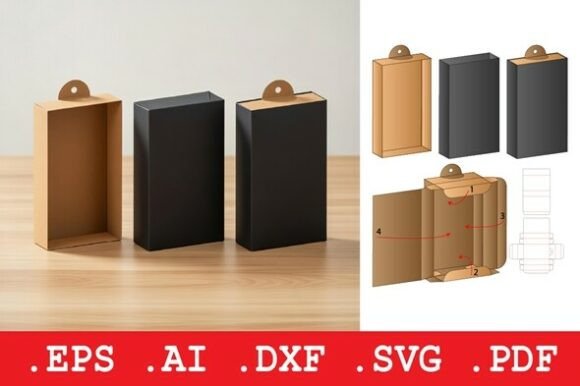
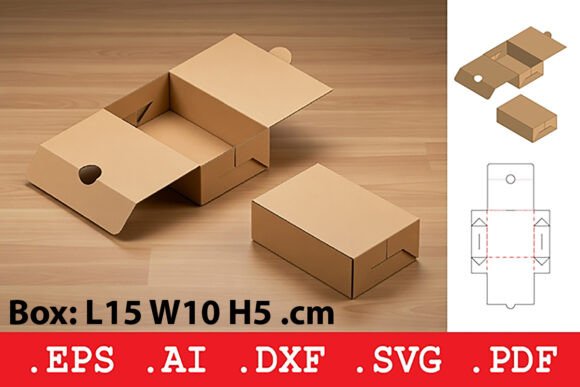
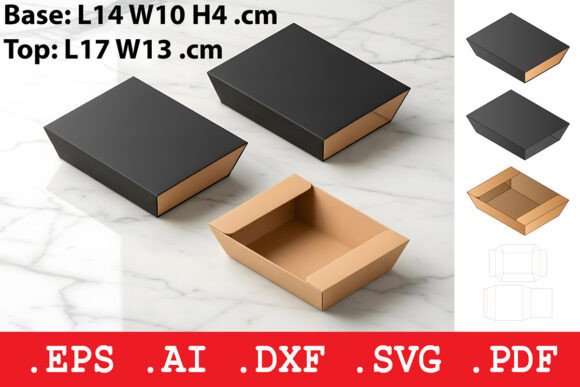
The Rectangular Tray Sleeve Box is a packaging template consisting of two primary components: a shallow, open tray base with slanted sides and a matching sleeve lid. This design facilitates a straightforward slide-on closure. Its modern, low-profile aesthetic with clean edges is not merely a visual choice; it's a functional one that promotes a secure fit and an elegant presentation. This box is engineered for optimal construction using 200-350 GSM paper, a specification that ensures the final product is sturdy, folds precisely, and holds its form. Recognizing this template as a standardized, yet customizable, asset is the first step in integrating it into your operational process.
Where does this template fit? Its application spans various stages. Before a product launch, it serves as a key asset in prototyping and cost estimation. During the production cycle, its compatibility with digital and industrial formats streamlines communication between designers, print houses, and assembly teams. After a product is ready, it becomes the final touchpoint that organizes and presents the item to the end user. For a small business owner, this might be the packaging for a new line of handmade jewelry. For a pastry chef, it could be the chosen vessel for premium confections. The template's versatility makes it a reusable resource across multiple projects or product lines.
Preparation and Integration with Other Tools
A successful implementation hinges on preparation and understanding how this template interacts with your existing tools and methods. The included file suite—.DXF, .SVG, .EPS, .PDF, and the original .AI source file—is designed for interoperability across a typical creator or manufacturer's toolkit.
The .DXF file’s compatibility with CNC and laser cutting hardware means it can be directly fed into automated fabrication processes, linking digital design with physical production. The scalable .SVG and .EPS vectors are essential for digital design workflows, allowing easy resizing and adaptation within software like Adobe Illustrator or Inkscape before sending to a professional printer. The .PDF acts as a common ground for manual cutting, viewing, and quick quality checks. Finally, the .AI source file provides the foundation for full customization, enabling designers to integrate brand logos, change colors, or adjust dimensions without recreating the core structure from scratch.
This multi-format approach eliminates a common workflow bottleneck: file conversion and adaptation. It allows different stakeholders—a freelance graphic designer, a marketing manager, and a local laser cutter service—to work with the same core template in their preferred environment, ensuring consistency and reducing errors. Your preparation should involve assessing which format aligns with each stage of your project and confirming the compatibility of your software and hardware with these files.
Practical Implementation for Different Use Cases
Integrating the Rectangular Tray Sleeve Box smoothly requires tailoring its use to your specific project. For a cosmetics brand, the workflow might begin with customizing the .AI file to incorporate specific pantone colors and embossing details for a luxury feel. The final .PDF would then be used for approving a physical proof from the printer. The low-profile design is ideal for creams or compacts, providing a secure yet easily accessible package.
In a stationery or publishing context, an educator or blogger creating a premium guide might use the template for a finished booklet and supplementary materials. The sleeve lid offers a clean, professional look suitable for retail or direct sales. The process here focuses on efficiency: using the .SVG file to quickly adjust the template size for different booklet dimensions within a digital design tool, then outputting a .DXF for a hobbyist using a craft cutter to produce a limited prototype run.
For a jewelry designer, the focus is on quality control and presentation. The slanted sides of the tray create a natural display angle for items. The workflow involves testing the structural integrity with the recommended 250 GSM card stock to ensure rings or delicate pieces are held snugly. The sleeve closure adds an element of discovery for the customer, enhancing the unboxing experience. Using the .EPS file ensures the design holds its vector integrity when sent to an industrial printer for a large batch order.
Optimizing for Efficiency and Long-Term Use
Beyond a single project, the Rectangular Tray Sleeve Box can become a standardized asset in your ongoing operations, contributing to organizational efficiency. By mastering the template once, you can replicate it for future products with minimal rework. This consistency aids brand recognition—customers begin to associate the clean, rectangular profile with your quality.
Consider creating a master project folder containing all the file formats, along with notes on your preferred paper weight (e.g., 300 GSM for heavier items, 200 GSM for lighter pastries), printer specifications, and assembly instructions. This turns the template into a ready-to-deploy resource. For entrepreneurs managing multiple product lines, this organization prevents packaging from becoming an ad-hoc, time-consuming task each time a new item is developed.
Usability extends to the end of the line: assembly. The design of the tray and sleeve, with precise folds, is intended for efficient hand assembly or automation. Training staff on a simple fold-and-slide process, or programming a machine for automatic construction based on the .DXF outlines, can significantly speed up packaging before shipping. This practical attention to the final hand-off stage is where a good template proves its value in the real-world workflow.
Observations on Quality and Outcome
A key observation when implementing this template is the relationship between material choice and the final outcome. The specification of 200-350 GSM paper is a guide, but your selection within that range directly affects perceived quality and durability. Testing prototypes with different weights is a worthwhile step in your process. A 350 GSM tray for a small electronic accessory feels substantial and premium, while a 220 GSM version for artisan chocolates might be more cost-effective and still suitably sturdy.
The secure fit of the sleeve lid also plays a role in quality control during shipping. A well-fitting sleeve minimizes movement and potential damage to the contents. In your workflow, include a test phase where packaged products are gently shaken to simulate transit, ensuring the design meets your protection standards.
Ultimately, the integration of the Rectangular Tray Sleeve Box into your process is about creating a reliable, repeatable system for product presentation. It moves packaging from being an afterthought to a considered component of your brand's execution. By leveraging the provided file formats for different stages, preparing through material testing, and organizing the template for long-term reuse, you can achieve a streamlined workflow that results in a consistently elegant and professional final product.